Turn your everyday power needs into a plan you can explain. Organize appliances, explore battery and solar tradeoffs, and see how the pieces connect before you choose equipment.
In active development. The Gumroad product is currently not for sale; view its details and release information.
VOLTGRID / CONNECTED SYSTEMDESIGN DRAFT
01 / CONNECT THE BIG PICTUREActual app diagram • illustrative inputs • planning draft Open full-size diagram ↗
LOADS → SIZING → CONNECTIONS → REVIEWClarity before equipment decisions.
ONE WORKFLOW. DIFFERENT HORIZONS.
Build around the way you use power.
For hands-on owners planning a first system or rethinking an existing setup. Move from a list of appliances to specific questions about capacity, charging and connections.
≈
01 / ON THE WATER
Boat & sailboat
Make the energy needs of refrigeration, lighting and navigation visible together. Compare the role of solar, alternator and shore charging against the way you spend time aboard.
Marine context. Project-specific review.
↗
02 / ON THE ROAD
RV & overlander
Plan around your travel day, not a generic battery size. Put mobile loads alongside roof solar, driving and shore charging so you can question the assumptions before selecting equipment.
Mobile loads. Multiple charging sources.
⌂
03 / AWAY FROM THE GRID
Cabin & tiny home
See what your expected daily use asks of a fixed system. Compare autonomy and solar replenishment assumptions before committing to a battery bank or panel quantity.
Fixed systems. Seasonal assumptions.
BEFORE THE EQUIPMENT DECISIONS
Replace disconnected guesses with a connected plan.
VoltGrid helps you keep the reasoning visible, so you can spot questions and mismatches while the plan is still easy to change.
Start with your actual use.
Put appliance watts, daily use and quantities together. Make the assumptions behind your demand estimate explicit instead of choosing a system from a generic example.
Compare before you commit.
Explore how capacity, autonomy and charging assumptions affect the plan. Use the differences to decide what needs more research before equipment selection.
Keep the story consistent.
Carry the planning inputs through sizing, the connected view, simulation and parts review. Cross-check the same system instead of piecing together unrelated calculators and notes.
Explore the official listing. Currently not for sale.
A PRACTICAL WAY THROUGH
From “what will I run?” to “what needs review?”
You do not need a finished design to start. Begin with what you know, then refine the assumptions as the system takes shape.
01
Describe the day.
Choose your setting and organize the appliances you expect to run, including their power and daily use.
02
Explore the tradeoffs.
Review battery and solar assumptions. Try an assumed day in the simulator and see what changes.
03
Prepare better questions.
Review connections, unresolved inputs and parts together. Take specific questions to suppliers and a qualified professional.
INSIDE THE PLANNER
Know what changes. Understand why it matters.
Actual product screens below use illustrative planning inputs. Values describe these examples, not a recommended installation.
01 / LOADS & SIZING
Start with demand. Understand the tradeoffs.
A fridge that cycles, lights used every evening, and an occasional high-power appliance do not ask the same thing of a battery. Enter power, hours and quantities together to build a daily demand picture you can inspect and adjust.
Keep AC and DC appliance demand organized in one place
Compare battery capacity with your autonomy assumptions
See how solar replenishment changes with the inputs
ACTUAL APP UI / SIZING ADVISORY — open image for detail ↗
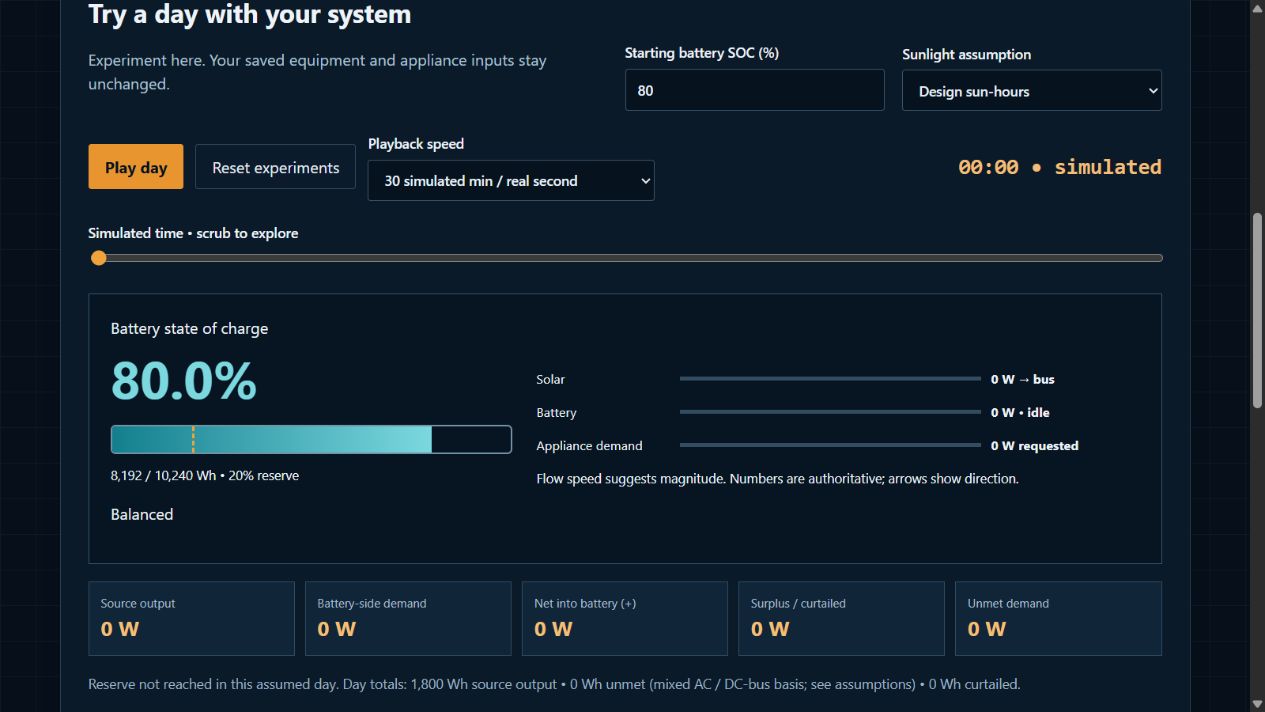
02 / SIMULATE A DAY
Explore the day before you build.
What if the battery starts the morning partly charged? What if sunlight is lower than you planned? Change the assumptions and follow simulated charge, source output and demand through the day. See potential shortfalls in the model before treating a runtime estimate as a plan.
A scenario model, not a forecast or a guarantee of runtime.
ACTUAL APP UI / DAY SIMULATION — open image for detail ↗
03 / CONNECTED DIAGRAM
See the system, not a shopping pile.
A list of components does not explain how they work together. Follow the project-specific paths from sources and storage through conversion, protection and loads. The connected view and associated schedule make missing inputs and unresolved ratings easier to discuss with a qualified reviewer.
Bring equipment choices into a structured bill of materials instead of rebuilding a list from scattered notes. Use it to organize supplier questions and review quantities alongside the plan. It is a starting point for verification, not a guaranteed complete shopping order.
Equipment compatibility and final ratings still require verification.
WHERE THINGS STAND
A working product. An evolving preview.
VoltGrid Studios is in active development. The official Gumroad product listing currently says it is not for sale. This website shows development work, which may differ from the version described on Gumroad. View the listing for release details and check availability there.
A planning workspace. A plan you can keep refining.
For owners who want to understand their system choices before working with suppliers or installers. Guided inputs provide a way in; visible assumptions make it possible to ask more detailed questions as you learn.
It is software for exploring and organizing a preliminary plan. It does not inspect your installation or make final design decisions for you.
What the Gumroad listing describes
A version-specific local application ZIP
Windows launcher and startup instructions for other environments
Quick-start information and the selected license files
What you need to run it
A computer, a modern browser and a local web server started using the supplied instructions. Core project work runs locally; optional manufacturer links or live external data need internet access.
The preview shown here is development work. Confirm the exact release, included files, license and requirements on Gumroad before any future purchase.
Research categories for your plan. No equipment is endorsed or sold through this preview.
01
Batteries & storage
Check nominal voltage, usable energy, continuous and surge current, temperature limits and permitted series/parallel configurations.
02
Solar & controllers
Compare panel dimensions, cold-weather open-circuit voltage, string current and controller input limits with your mounting space.
03
Inverters & charging
Match input voltage, continuous output, surge demand and charging profiles. Check shore or utility compatibility and transfer arrangements.
04
Wire & protection
Review route length, voltage drop, installation conditions, fuse interrupt rating, disconnects and manufacturer protection requirements.
05
Distribution & monitoring
Plan busbar and panel ratings, branch protection, shunt placement, enclosure conditions and access for inspection.
LINK STATUS
Verified links come next.
Supplier links will be added only after destination, regional availability and any affiliate relationship are verified.
Affiliate disclosure: No affiliate relationships are approved and no affiliate links are active in this preview. If approved links are added later, VoltGrid Studios may earn a commission from qualifying purchases; those links will be identified. Renogy is under review; Battle Born and Butler inquiries are pending.
A FEW USEFUL ANSWERS
Before you start planning.
Will this help if I am still learning?
The guided workflow starts with familiar questions about your appliances and how you use them. It helps you see what the inputs mean for the plan. You still need measured or manufacturer data and qualified review for final equipment and installation decisions.
Can it tell me exactly how long my battery will last?
It can model an assumed day and show the effects of inputs such as starting charge, sunlight and demand. Real weather, equipment behavior and usage vary. Treat the result as a way to compare scenarios, not a runtime promise.
Why use this instead of separate notes and calculators?
The value is keeping appliance demand, sizing assumptions, connections, simulation and parts review in one workflow. That makes the reasoning easier to revisit when you change an input or discuss the plan with someone else.
Will the parts list tell me everything to buy?
It provides a structured starting point based on the plan. Exact compatibility, quantities, installation accessories, local requirements and final ratings still need verification with the supplier and qualified reviewer.
Is this a finished product release?
This is a product development preview. It shows the planning workflow and illustrative app screens; it is not a downloadable release or checkout. The Gumroad listing currently says the product is not for sale. Development features may differ from the version-specific package described there.
Can I buy VoltGrid Studios here?
No. The official Gumroad listing currently says the product is not for sale. The links here open its details; this preview has no checkout or waitlist. Check that listing for any future availability change.
Does a diagram mean my installation is approved?
No. The diagram and sizing outputs are planning aids. Site conditions, equipment instructions and applicable requirements need qualified review before installation.
Are the numbers in the screenshots recommendations?
No. They are illustrative inputs and results shown to explain the interface. Your equipment, usage and conditions may be different.
Does the Canada / US toggle certify equipment?
No. It changes the buying-guide checklist only. It does not verify suppliers, provide live pricing or certify suitability in a jurisdiction.
LET’S MAKE THE PLAN CLEARER
Questions about VoltGrid?
See whether the planning workflow fits your project.